Skip to content
tekr.ai

For restaurants, bars and hospitality groups

The intelligence layer for hospitality operations

Tekr connects the systems you already run and turns them into a clear account of what is happening in your business, why it is happening, and what to do next.

Tekr works alongside your POS, rota and accounts. It does not replace them.

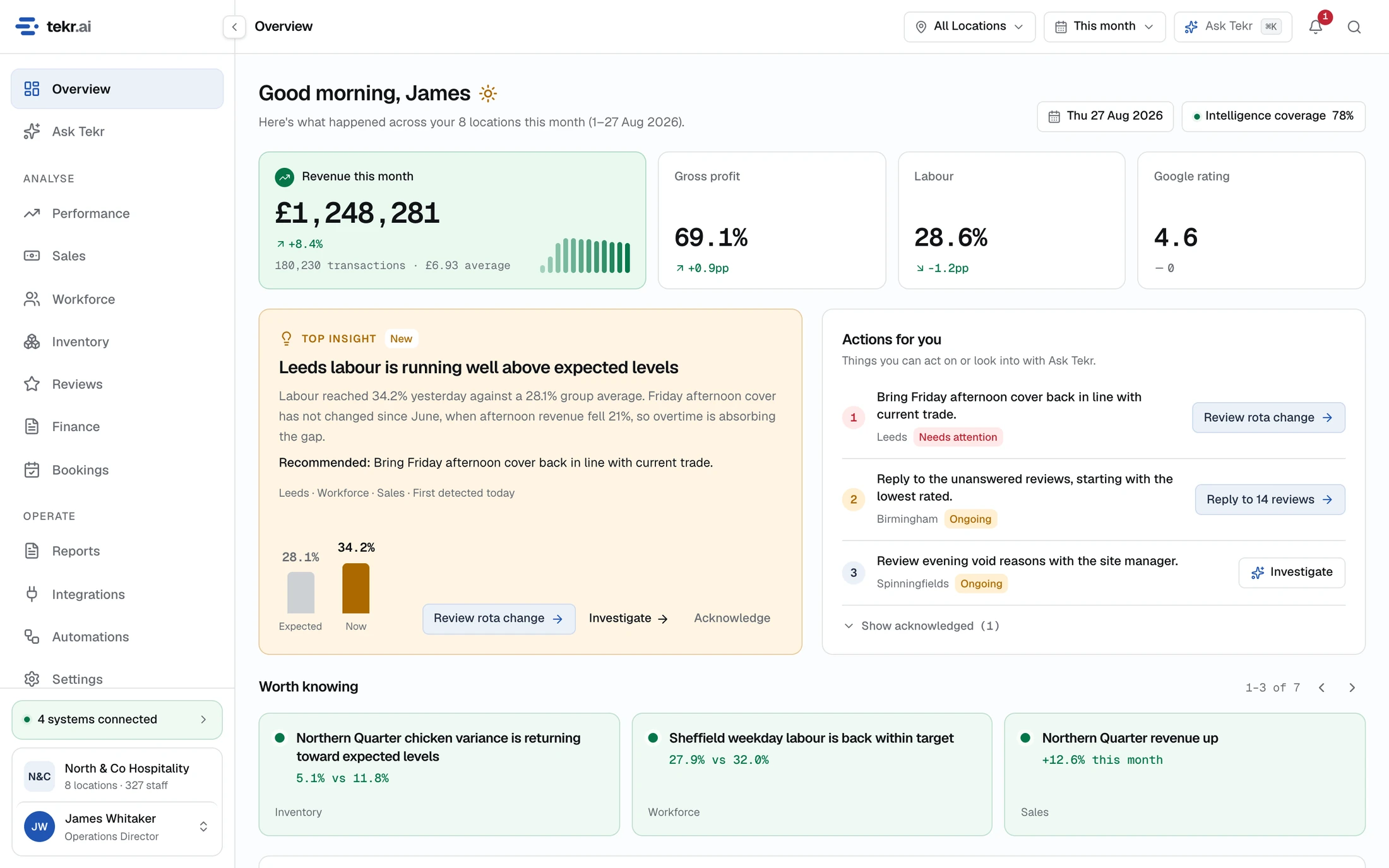
The Tekr Overview page showing revenue, gross profit, labour and rating, a top insight and a list of actions.
Shown with demonstration data.

How it fits

Hospitality has plenty of software. The intelligence is still fragmented.

Each system understands its own part of the business, and operators are left to join the story up themselves. Tekr reads from each of them and connects the data by site and by day.

  • Point of saleSales, products, transactions and voids
  • WorkforceRotas, hours worked and labour cost
  • InventoryStock, waste, variance and supplier prices
  • BookingsCovers, cancellations and forward demand
  • ReviewsRatings, themes and replies
  • FinanceLedger costs, margin and profitability

One view of the operation

Sales, labour, stock, bookings, reviews and finance, measured the same way at every site.

  • What is happening
  • Why it is happening
  • What to do next

Tekr does not replace any of these systems.

Your team keeps taking payments, writing rotas, counting stock and doing the books exactly where they do now. They stay the source of truth. Answering “why was labour high?” can take the till, the rota, bookings and reviews together, and that is the part Tekr does.

Operational intelligence

One clear story, not six disconnected dashboards

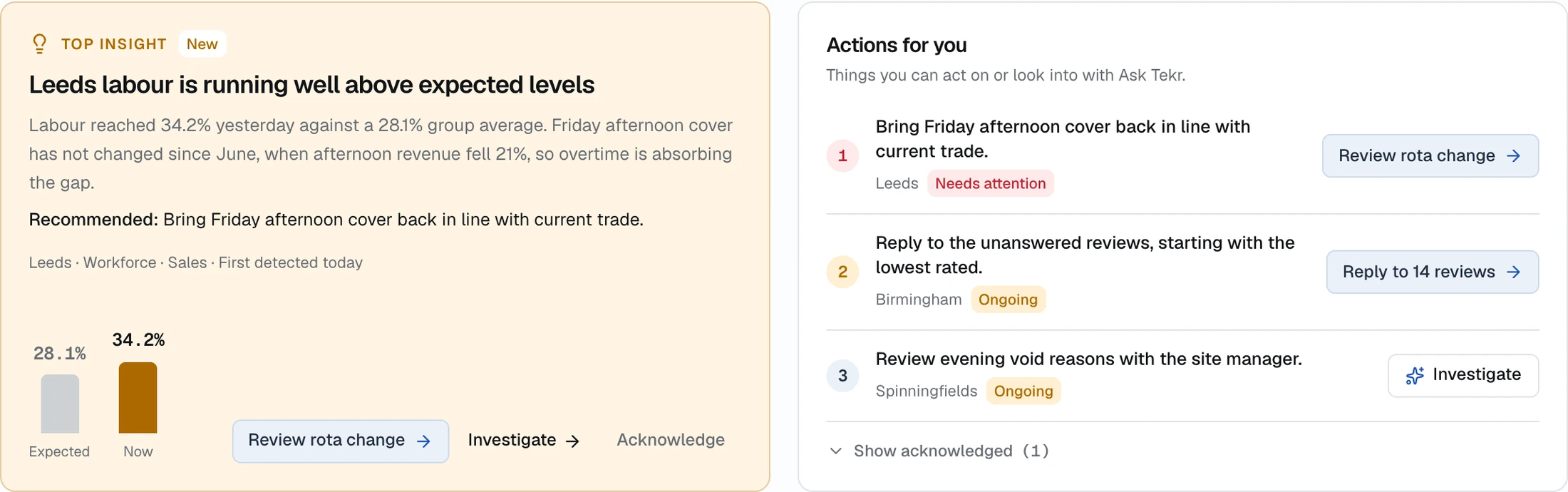
Each insight answers three questions, using data from more than one system. This one comes from the demonstration account.

  1. 1What is happeningLabour at one site reached 34.2% of sales, against 28.1% across the group.
  2. 2Why it is happeningFriday afternoon cover has not changed since June, when afternoon revenue fell 21%. Overtime is absorbing the gap.
  3. 3What to do nextBring Friday afternoon cover back in line with current trade. Tekr prepares the rota change for someone to approve.
A Tekr insight explaining that labour at Leeds is above expected levels, with a recommendation and a list of actions.
Shown with demonstration data.

Product

What you get

These are screens from the product itself, running on a demonstration group of eight sites.

Across systems

Sales and labour, read together

Your till knows what you sold and your rota knows who was on. Tekr puts the two side by side, hour by hour and site by site, so you can see where cover is running ahead of trade.

  • Revenue against labour cost by hour
  • Labour as a share of sales, ranked by site
  • The same comparison for stock, bookings and margin
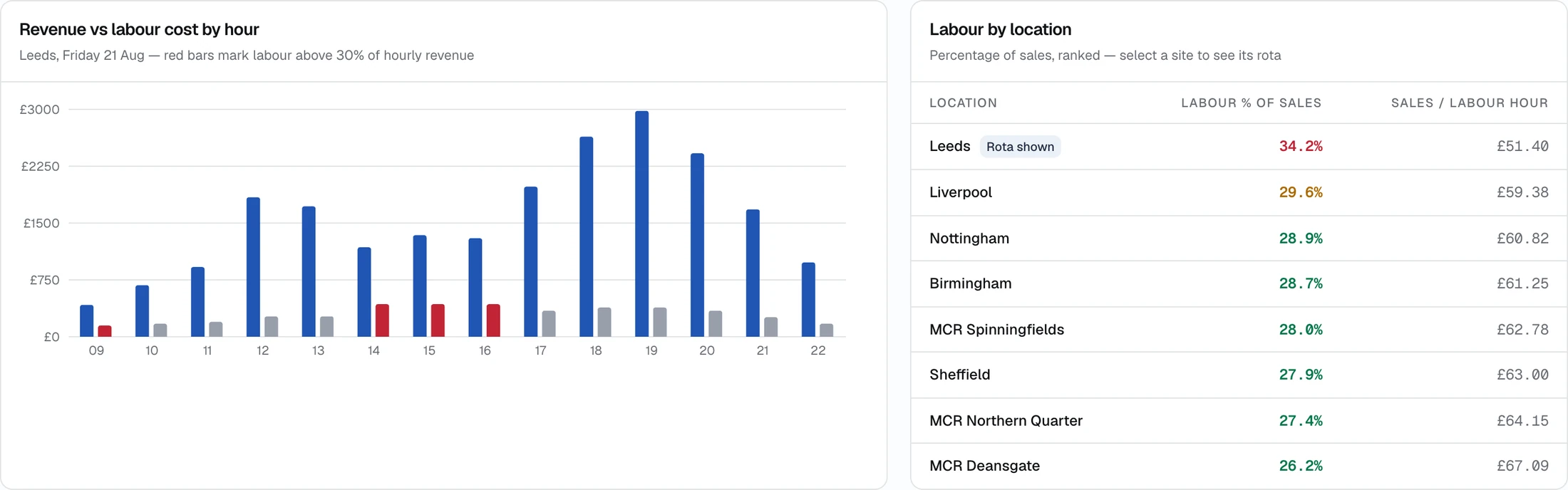
A chart of revenue against labour cost by hour, beside a table of labour percentage by location.
Shown with demonstration data.

Reviews

What guests are saying, and what is behind it

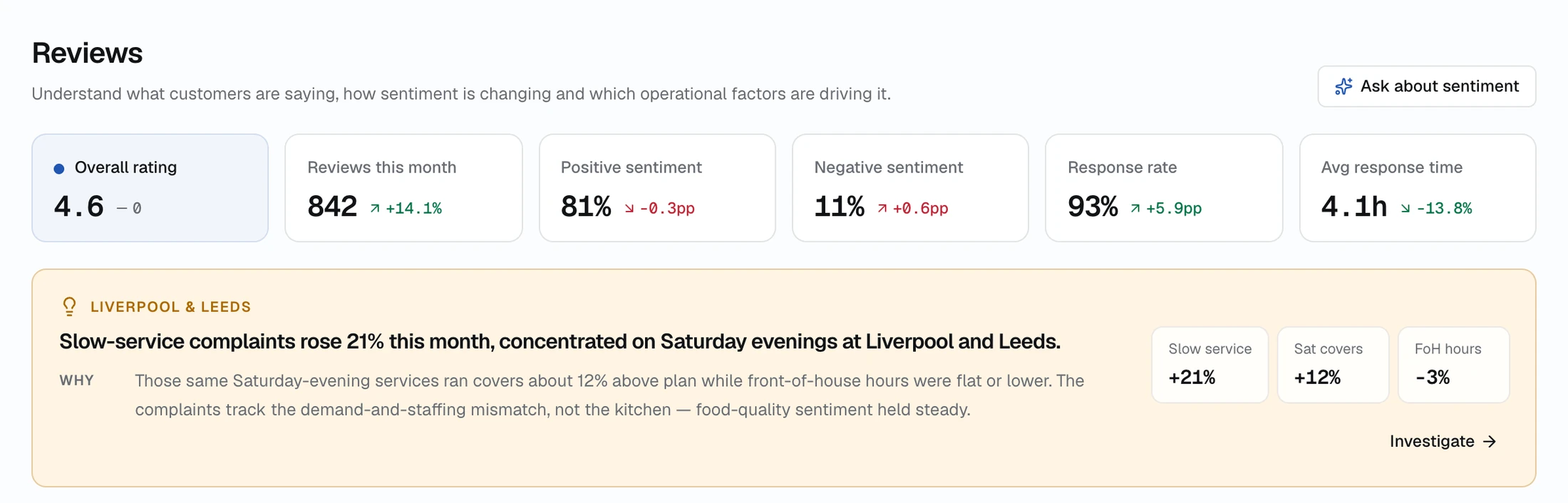
Tekr reads review themes alongside what was happening in the business at the time. A rise in slow-service complaints is shown next to the covers and staffing on those same shifts.

  • Rating, sentiment and response rate
  • Themes, and whether they are getting better or worse
  • Replies drafted for you to edit and approve
The Tekr Reviews page with rating figures and an insight linking slow-service complaints to Saturday evening staffing.
Shown with demonstration data.

Ask Tekr

Ask a question in plain English

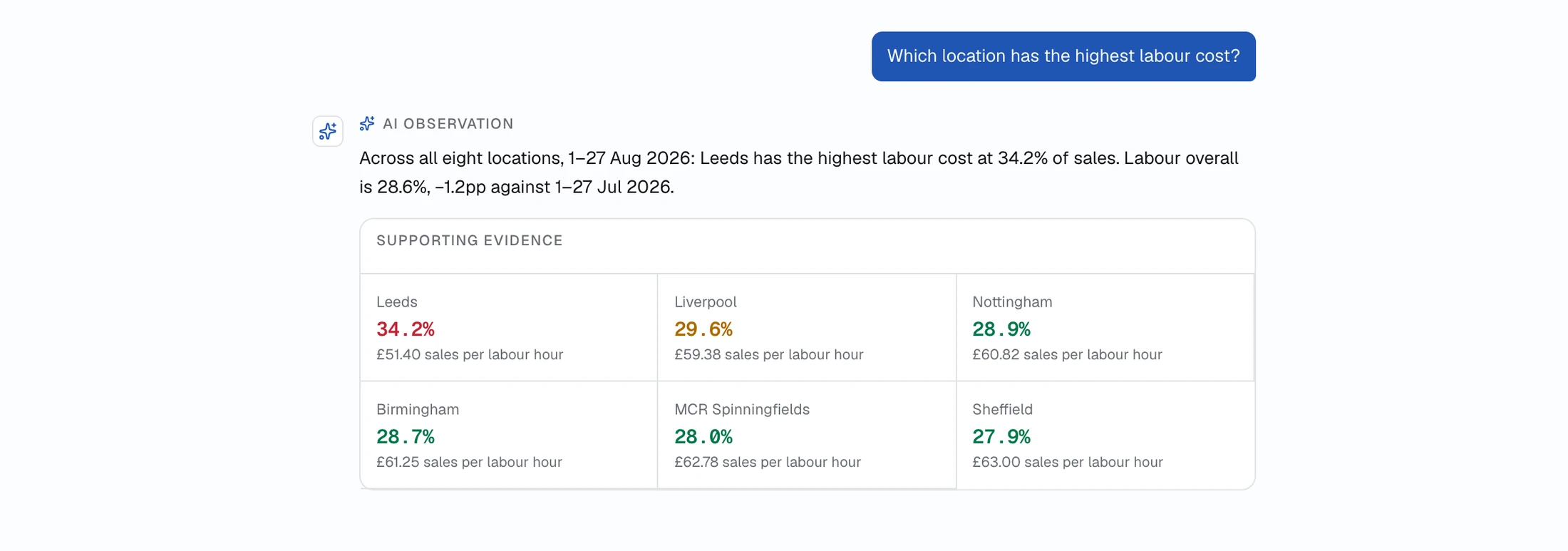
Ask about any site, period or part of the business. The answer comes with the figures behind it, limited to the locations and modules that person is allowed to see.

  • Answers for the locations and dates in view
  • Supporting evidence shown with every answer
  • A monthly allowance, so usage stays predictable
A question about which location has the highest labour cost, answered with a figure for each site.
Shown with demonstration data.

Briefings and reports

The right summary, to the right person, on schedule

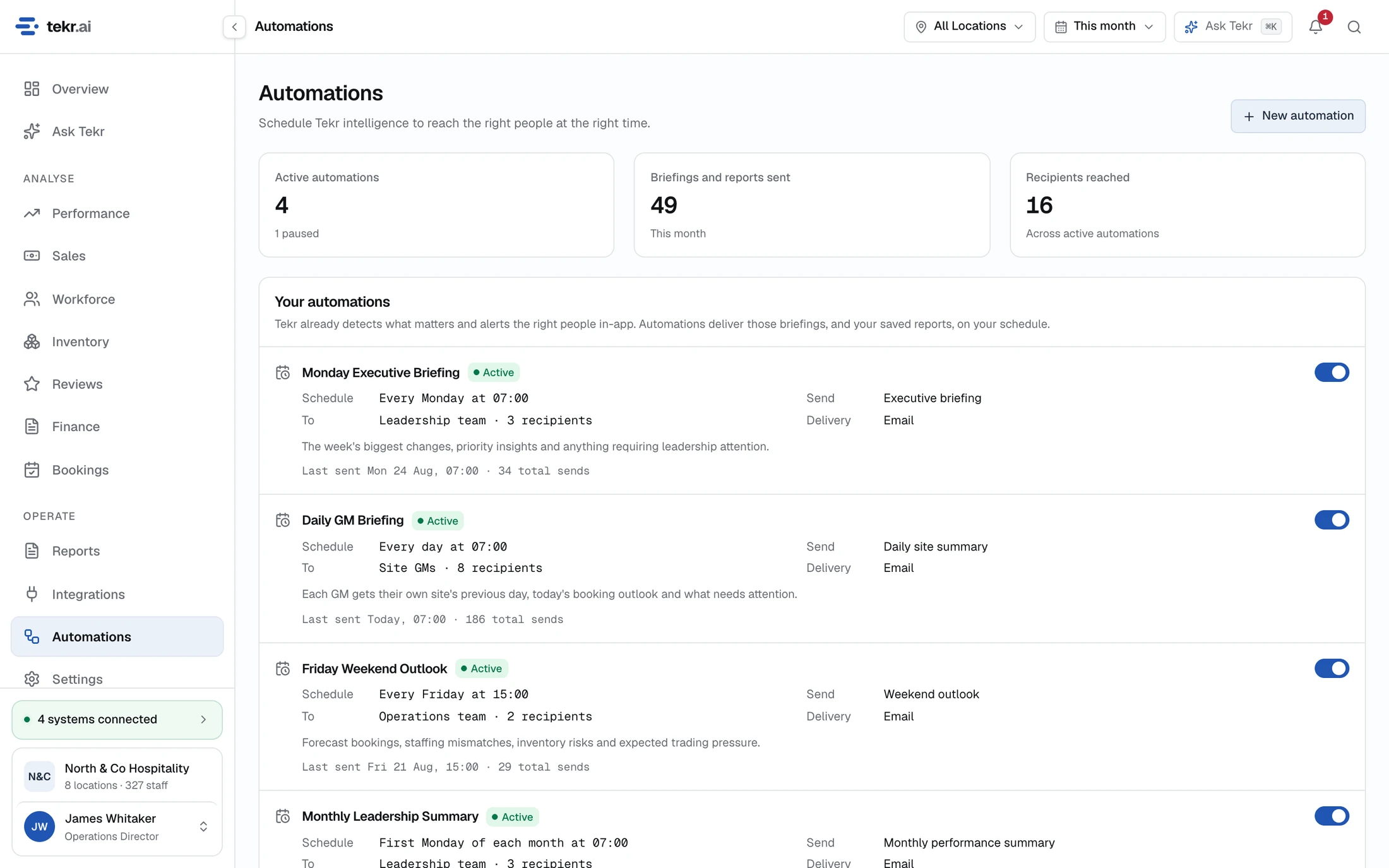
Site managers get their own site each morning. Leadership gets the week across the group. Saved reports run on the latest data and can be sent the same way.

  • Daily, weekly and monthly briefings
  • Saved reports sent on a schedule
  • Each person only receives the sites they can access
The Tekr Automations page listing scheduled briefings, who receives them and when.
Shown with demonstration data.

Who it’s for

For the people who run hospitality, and the platforms they rely on

Independent operators

One site, several systems and no analyst. Tekr does the joining-up for you and tells you what deserves your attention today.

Restaurant groups

Compare sites on the same terms, see which ones are drifting, and give each manager a view of their own site without exposing the rest.

POS and technology partners

Tekr sits on top of your platform and makes its data more useful to your customers. It does not compete with what you sell.

How a partnership works

How Tekr is built

Designed to be trusted with the numbers you run the business on

Figures are calculated, not generated

Every number comes from a defined calculation on your own data. AI is used to explain and summarise, never to produce a figure.

Nothing changes without approval

Tekr can prepare a rota change or a reply to a review. It is only sent to the other system when someone with permission approves it.

Access follows your organisation

People see the sites and areas of the business they are responsible for, and nothing else. That applies to pages, answers and emails alike.

Insights that persist, not alerts that repeat

An issue is tracked from the day it is detected until the figures show it has resolved. Acknowledge it and Tekr stays quiet unless it gets worse.

See what Tekr would show you about your own operation

We will walk you through the product and talk about the systems you use today.